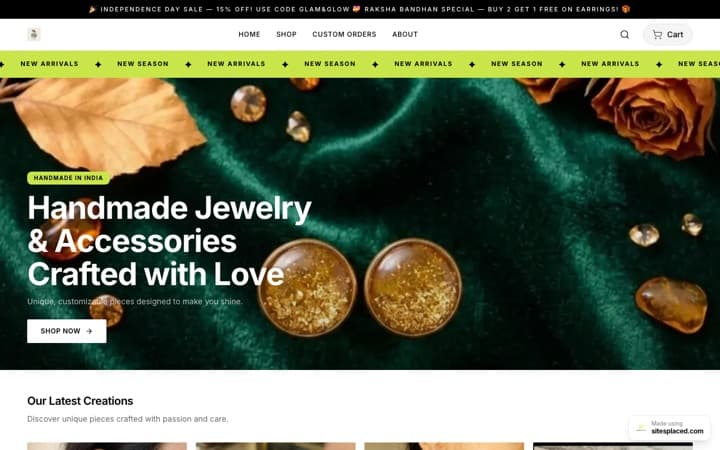


Product photos that sell: from a phone photo to studio shots with AI.
On a small store the photo is the product. Nobody can touch the fabric or smell the candle; they decide from a picture in about a second, and a photo taken on a bed with a tube-light shadow across it tells them the store is small before they have read a word. This guide is the whole path from one honest phone photo to a set of studio-quality images, using the Creative studio in the SitesPlaced AI Co-founder — which styles to use for which products, what it keeps identical, what you still check, which sizes go where, and what it costs in credits.
The base photo: the one thing the AI cannot fix
Every image the Creative studio makes starts from a photo you took. It changes the scene, the surface, the lighting and the camera; it keeps the product. So if the base photo is blurred, the product is blurred in every studio shot too. Ten minutes on the base photo saves a hundred credits of regenerating.
- Daylight, not tube light. Near a window, in the morning or late afternoon, no direct sun. Indoor LED and tube light give a green or yellow cast that the AI faithfully keeps.
- Plain background. A white chart paper, a plain wall, a bedsheet without print. The studio replaces the background, but it needs to see where the product ends.
- No hard shadows. Move the product away from the wall and put a white sheet of paper on the shadow side to bounce light back. A soft shadow is fine.
- Product filling about 60% of the frame. Close enough that the label is readable, far enough that nothing is cut off. Do not zoom; walk closer.
- Three angles. Front, three-quarter, and a detail (the clasp, the weave, the label). The front photo is the base for packshots; the others are for the gallery and for your own reference when you check the AI images.
- Wipe it. Dust on a phone case, a fingerprint on a bottle, a loose thread on a kurta — the AI keeps those too.
The phone-camera basics — focus by tapping, turning off the flash, using the main lens rather than the wide one — are in how to take better product photos. Do that once, then the rest of this guide is the AI part.
Which of the six product styles to use
The Creative studio has twelve styles in all — six product photo styles, four ad creatives and two festive frames — plus two carousel slide styles. For the product page you need the six product styles. Each one is a written recipe that tells the image model the layout, the surface, the light and the camera, and says in every case to keep the product exactly as in your reference photo.
| Style | What it makes | Default size | Default tier · credits |
|---|---|---|---|
| Studio packshot | Clean catalogue shot on a seamless off-white background, soft contact shadow. The first image every product needs. | 1:1 | Standard · 12 |
| Lifestyle scene | The product in a warm, tidy Indian home or café setting; the product sharp, the background softly blurred. | 4:5 | Standard · 12 |
| Hand-held (UGC style) | A hand holding the product up to the camera, phone-photo look, no face. The format that performs in Reels and ads. | 9:16 | Standard · 12 |
| Flat lay | Top-down on linen or stone with three to five small props around the product. | 1:1 | Standard · 12 |
| Premium editorial | Magazine-grade hero with dramatic light and a deep gradient backdrop, for banners and launch posts. | 4:5 | Premium (2K) · 25 |
| Food hero | Appetising food and drink with steam, drips and crumbs where they belong, warm window light. | 4:5 | Premium (2K) · 25 |
You can change the size and the tier on every style. The defaults are the ones that suit the style best.
Which to use depends on what you sell:
| Category | Cover image | Gallery images | Why |
|---|---|---|---|
| Jewellery | Flat lay | Premium editorial, hand-held | Flat lay shows scale next to small props; editorial light makes metal and stones read as expensive. Hand-held shows it on a real hand for size. |
| Food, sweets, snacks | Food hero | Studio packshot of the packaging | Buyers buy the dish, not the box. The packshot of the packaging goes second so they know what arrives. |
| Apparel | Lifestyle scene | Hand-held, flat lay | Fabric needs a setting to show drape and colour; a hand holding it shows texture up close. Note the limit below on models. |
| Home decor, candles, diyas | Lifestyle scene | Studio packshot, flat lay | Decor sells as a room, not an object. The packshot is for the catalog and Meta feed. |
| Cosmetics, skincare | Premium editorial or studio packshot | Flat lay, hand-held | Packaging is the product here; the editorial light or a clean packshot shows it best. Labels must be checked closely (see below). |
| Stationery, gifting, crafts | Flat lay | Lifestyle scene | Flat lay is the native format of gifting and stationery on Instagram. |
A packshot for every product, no exceptions
Whatever the category, generate one Studio packshot per product even if it is not the cover. The product feeds send the cover as the main image and the rest of the gallery as extra images to Meta Catalog and Google Merchant Center, and the packshot is the one to upload to a WhatsApp catalog — small thumbnails where a busy background makes the product unreadable.
How the studio keeps the product identical — and why you still check every image
Every style's recipe includes the same sentence to the model: use the attached photo as the exact product; keep its shape, colour, label, pattern and proportions identical; only change the scene, surface, lighting and camera. It also tells the model what not to do — no invented logos, no fake certification marks, no garbled text, no extra products that are not in the reference. Behind the scenes the studio runs through OpenRouter on GPT Image 2 for draft, standard and ultra tiers and Gemini 3 Pro Image for the 2K premium tier, with Seedream and Nano Banana 2 as fallbacks — chosen for quality per rupee, with automatic fallbacks if one fails.
In practice the product comes back right most of the time. Most of the time is not every time, and the misses are small enough to slip past a quick glance. Before you press Set as cover or Add to gallery, hold your base photo next to the result and check five things:
- Shape and proportions. A slightly taller bottle, a rounder box, a bangle that became an oval.
- Colour. Warm scenes can push a teal to green; a “Diwali” scene can push everything gold. Compare against the base photo, not memory.
- Label and text. The most common miss. Six words on the label can come back as five, or with one letter changed. Cosmetics, food and anything with an ingredient list need this check most.
- Count. A set of four diyas should still be four. Sets and pairs sometimes gain or lose one.
- Nothing extra. No second product, no prop that looks like something you sell, no logo you do not own.
If an image misses, regenerate — a different scene or a rewritten details line usually fixes it — and if a generation fails outright the credits come back automatically. A near-miss that you approve, though, is a photo of a product you do not sell, and that is the one thing a product photo must never be.
Sizes: product page vs Instagram vs WhatsApp catalog
The studio offers five sizes and you pick one before generating. Nothing is worse than a 9:16 story image cropped to a square thumbnail with the product's head cut off, so match the size to where the image is going:
| Where it goes | Size | Notes |
|---|---|---|
| Product card and cover | 1:1 square | Works on every SitesPlaced template's product grid. The packshot's default. |
| Product page gallery | 3:4 tall or 4:5 | Tall images give the product page more presence on a phone. Use 3:4 for the extra angles. |
| Instagram feed post and Meta feed ads | 4:5 | The most screen a feed post can take. Lifestyle scene and editorial default to it. |
| Stories, Reels cover, WhatsApp status | 9:16 | Keep the product in the middle; the top and bottom get covered by the app's own controls. |
| WhatsApp catalog | 1:1 square | WhatsApp shows catalog items as square thumbnails, so a packshot on a plain background is the only thing that reads at that size. |
| Store hero banner, YouTube | 16:9 wide | For the Festival sale banner and editorial hero images across the top of the store. |
One image per size is cheaper than it sounds: the same product at 1:1 and 4:5 at standard quality is 24 credits, and the storefront resizes and compresses each one for the screen it is shown on.
Putting the images on the product
Every generated image has two buttons under it when a product was selected: Add to gallery and Set as cover. Set as cover replaces the cover image and puts the old one in the gallery; Add to gallery appends. The cover is what the product card, the category page, the feeds and the WhatsApp share preview show, so make it the packshot or the flat lay. Then arrange the gallery on the product itself — the storefront shows images in the order they sit on the product — so the lifestyle scene comes second, the detail angle third, and the hand-held shot last. The Help Center page on adding products covers the gallery order and the fields around it.
A sensible set for one product is three images: packshot as the cover, one lifestyle or category-appropriate scene, one real phone photo of a detail. Buyers trust a gallery that has one obviously real photo in it more than one that is entirely perfect.
Credit costs and a sensible budget
The AI Co-founder plan is ₹1,499/month with 1,500 credits included every month, and it includes everything in the ₹499 Growth plan. One credit is ₹1 of face value. The four image tiers are:
| Tier | Credits | Use it for |
|---|---|---|
| Draft | 2 | Trying a scene or a details line before committing. Fast and rough — never a final image. |
| Standard | 12 | Product cards, galleries, social posts, WhatsApp. The default for four of the six product styles. |
| Premium (2K) | 25 | Hero banners, ads, anything with text on it, the editorial and food styles. |
| Ultra | 45 | Best text-in-image and realism, or a 4K file for print and large banners. |
Prices as published on the plan in September 2026. Failed generations are refunded. Top-ups: 500 credits ₹499, 1,000 ₹999, 2,500 ₹2,499, and top-ups never expire while you are subscribed.
For a store with twenty products, a full first pass — a standard packshot and one standard scene each — is 20 × 24 = 480 credits, a third of one month's allowance, and it replaces a photographer's day rate for the whole catalogue. Explore with drafts first when you are not sure of a scene: five drafts to find the setting costs 10 credits, then one standard at 12, instead of three standards at 36.
When a real photographer is still worth it
Honest limits, so you spend on the right thing:
- Apparel on a person. The hand-held style shows a hand and forearm, never a face, and no style puts your kurta on a real model with a faithful fit and drape. If fit is what sells the product, a model shoot — even a friend and a phone — still beats any generated image.
- Products whose value is in fine detail the phone cannot capture. Stone-set jewellery, glass, polished metal and anything highly reflective need a real macro photo as the base. The studio can only keep what the base photo shows.
- Labels and ingredient lists that must be exact. Food and cosmetics packaging with dense text should have at least one real, unedited photo of the label in the gallery, whatever else you generate.
- Size reference. A generated scene can make a 6-inch diya look 12 inches. Put a real photo with something familiar next to it, or state the size in the first line of the description.
- Variants that differ in a way the AI must not guess. Twelve colours of the same dupatta need twelve base photos, one per colour; the studio will not recolour a product, and it should not.
Everything else — the white background, the café table, the marigold-and-diya frame, the flat lay with props, the launch poster with your headline — is what the studio is for, from one phone photo, in a minute, for 12 or 25 credits. The wider case for AI product photos, with the before-and-after of what a small seller's catalogue looks like, is in AI product photos for small businesses in India.
FAQs
Does the AI change my product in the photo?
Every style tells the model to keep the product's shape, colour, label, pattern and proportions identical and to change only the scene, surface, lighting and camera, and it also forbids invented logos, garbled text and extra products. It gets this right most of the time, not every time — small label text and item counts are the usual misses — which is why you compare each result with your base photo before you press Set as cover or Add to gallery. Failed generations are refunded; near-misses you regenerate.
What phone photo do I need to start?
One photo in daylight near a window, on a plain background, with no hard shadows, the product filling about 60% of the frame and the label readable. Wipe the product first. Take a front view for the packshot and a three-quarter and a detail view for the gallery and for checking the AI results. The photo does not have to be beautiful; it has to be sharp and true to colour.
Which style should I use for jewellery, food, clothes, decor or cosmetics?
Jewellery: flat lay for the cover, premium editorial and hand-held in the gallery. Food: food hero for the cover, a packshot of the packaging second. Apparel: lifestyle scene for the cover, hand-held and flat lay after. Home decor and candles: lifestyle scene, then a packshot for the feeds. Cosmetics: premium editorial or studio packshot, with a real photo of the label in the gallery. Every product gets one studio packshot for the catalog feeds and WhatsApp.
What size should product photos be for the product page, Instagram and the WhatsApp catalog?
Square (1:1) for the product cover, card and WhatsApp catalog, which shows square thumbnails. 4:5 for Instagram feed posts and Meta feed ads. 3:4 or 4:5 for extra product-page gallery images. 9:16 for Stories, Reels covers and WhatsApp status. 16:9 for the store's hero banner. The studio lets you pick the size before generating, and the storefront resizes and compresses each image for the screen it is shown on.
How many credits do product photos cost?
Draft 2, standard 12, premium (2K) 25, ultra 45 credits per image. The AI Co-founder plan includes 1,500 credits a month, so a packshot and a lifestyle scene for twenty products is 480 credits. Failed generations are refunded and top-ups start at 500 credits for ₹499.
Is a real photographer still worth paying for?
For some products, yes: clothes on a real model where fit sells the item, highly reflective jewellery or glass that needs a proper macro photo as the base, food and cosmetics labels that must be exact, and anything where a real size reference matters. For backgrounds, scenes, festive frames, flat lays and ad creatives, the studio does the work from one phone photo for 12 to 25 credits per image, and a photographer's day rate no longer makes sense.
Turn one phone photo into a catalogue.
Studio packshots, lifestyle scenes, flat lays, editorial heroes and food shots from a single phone photo — the product kept identical, the result attached to the product in one click. The Creative studio is part of the SitesPlaced AI Co-founder, ₹1,499/month with 1,500 credits, everything in the Growth plan included.
See the Creative studio →